Crafting Click-Worthy Podcast Episode Titles with ChatGPT
Learn how to turn raw podcast transcripts into compelling episode title ideas that get found, clicked, and shared.


Episode titles do a ton of the heavy lifting when it comes to podcast discoverability, but many of us tend to overlook them. A title that’s vague, too clever, or missing the right keywords can quietly make your episode harder to find in search… even if the content itself is fantastic.
In the previous post, I walked you through this whole ChatGPT for podcast SEO series and what we’re going to tackle together. This post jumps into our first hands-on skill: crafting podcast episode titles that work for both humans and the machines helping listeners find your show.
In this how-to guide, you’ll see exactly how I use ChatGPT (aka “Chatty”) to turn a raw podcast transcript into a clear, clickable, search-friendly title.
Even small title tweaks have helped my older episodes suddenly get more downloads. Optimizing search for your entire podcast catalogue is powerful.
If you don't have a transcript handy yet, don’t stress; you can use Alitu to get yours. It's also worth noting that I’m using the free version of ChatGPT in this walkthrough because I want this to be accessible to indie podcasters regardless of your production budget.
Step 1: Start a Fresh Chat and Set the Stage
Open a new ChatGPT window and let Chatty know what you’re working on. Just talk to it like you would to a creative friend.
Here is how I start:
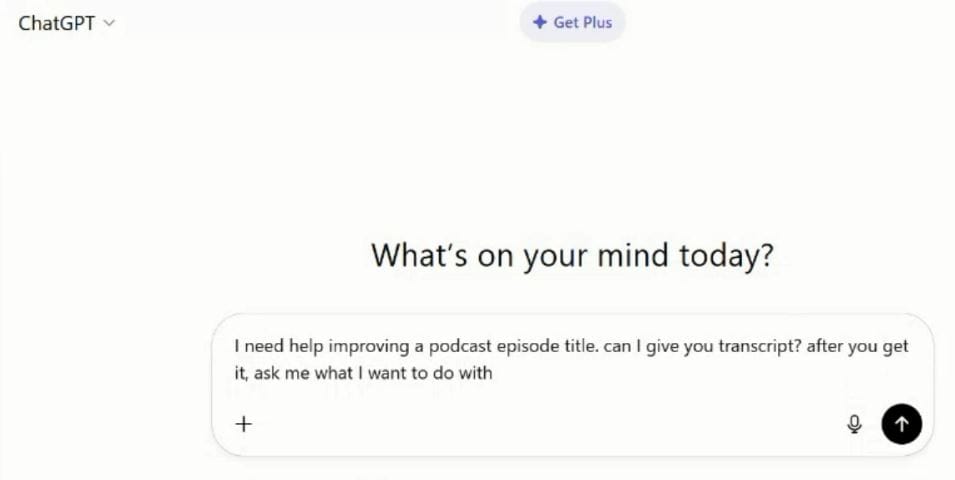
This keeps the workflow clean so Chatty doesn't jump ahead before you're ready.
Step 2: Upload or Paste in Your Episode Transcript
To make this podcast episode magic happen, add your transcript to ChatGPT. You can upload the transcript as a Word Doc or PDF, though the free tier might limit this at times. If you can't upload, and it won't even let you copy the transcript in, then just paste it in chunks.
For my example, I just pasted in the first 20 pages of a 90-minute episode transcript. That was more than enough for it to get the gist of the episode.
Step 3: Tell ChatGPT What Your Actual Goal Is
Once Chatty has the transcript and asks what you want to do, write a specific task.
Here’s my prompt:
I want to maximize this episode title for search. What would listeners type into Google, podcast apps, or YouTube to find an episode about this conversation?
These instructions keep ChatGPT focused on listener search behavior because it clearly explains what search means in this context.
Step 4: Slow ChatGPT Down
By default, ChatGPT likes to give you everything at once. It’s trying to be helpful, but when you’re working with a full podcast transcript, that can get overwhelming fast.
Instead, try prompt chaining. This back-and-forth method of communication with ChatGPT is telling Chatty, “Hey, slow down and let’s work on this one bit at a time.” That’s what I did in the below prompt after Chatty asked me many questions at once.
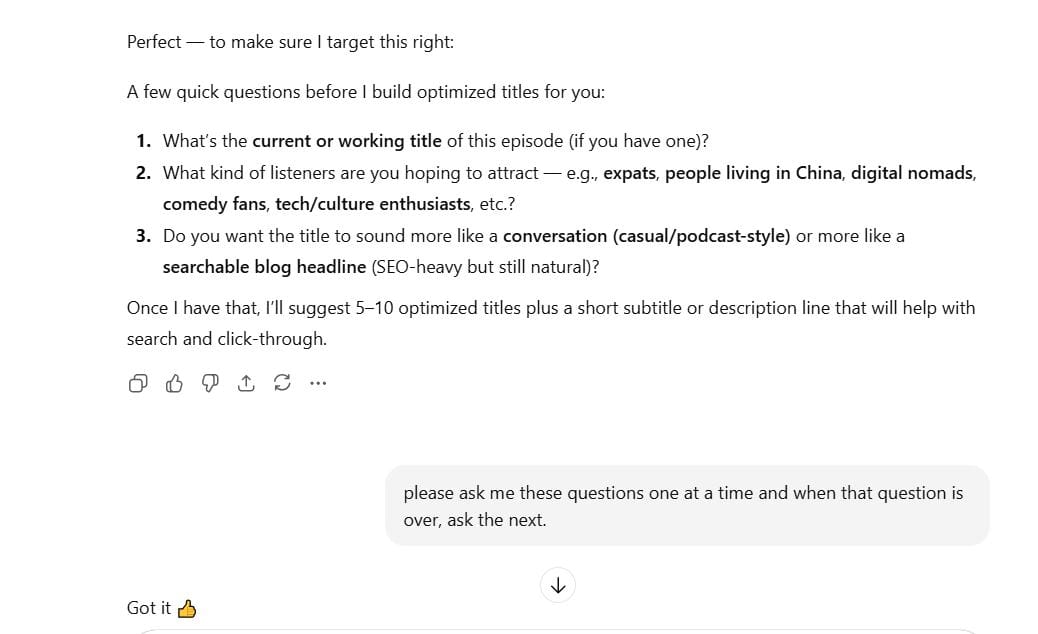
This one tiny step makes the entire workflow smoother and more manageable. However, if you prefer to have all the information in a megaprompt, you absolutely can. Just combine all your instructions in one go. Use whichever method feels most natural for you.
Step 5: Look at the First Round of Title Suggestions
Once ChatGPT has what it needs, it will generate a handful of potential titles. Here is the list it gave me.

In this Geopats Abroad example, I used an older episode from before I understood SEO well. Chatty immediately pulled out key searchable phrases like “Expat in China”, which I somehow didn’t include in the original title. That tiny shift made a huge difference in discoverability.
Step 6: Refine, Adjust, and Shape the Title
Now you get to fine-tune the options until one feels right. Prompt chain until you get a title that rocks your world.
Some edits we (Chatty and I) came up with were:
- Remove the guest name.
- Put “Expat in China” at the front.
- Remove the colon.
- Give me more emotional variations.
Prompt chaining can make this part feel natural and creative rather than rigid and clinical.
Step 7: Finalize Your Title
When you find a title you like, compare it to the original. Does it include the essential words or phrases that listeners might search for? If yes, then change the title in your podcast hosting account.
This is the transformation from my real example.
Original Title:
Andy Curtain, Australian Comedian & Host of Stuck In The Middle Podcast On His Virtual Identity
New Title:
Expat in China: How Life Abroad Can Reshape Your Online World
Why This Version Works
- It has two keywords that are often used in search for this type of content: “expat” and “life abroad”
- It balances emotion and clarity, so it appeals to both people and machines.
- It reflects the actual content in a way that a listener can instantly understand.
When I’ve updated older episodes using this method, I’ve seen a noticeable boost in downloads, even on shows I published years ago.
👀 Watch This Process In Action
If you want to see this whole process play out on screen, the companion video walks through each step in real time. It is especially helpful for understanding the back-and-forth flow.
Conclusion
ChatGPT is great at identifying words and phrases that your audience is already using to search for content like yours. When you combine those suggestions with your own creative instincts, you get titles that make it easier for new listeners to find your episodes. You can also combine this ChatGPT prompt chaining with our WHISPER TITLES framework to come up with new episode ideas and their episode titles at the same time. So why not try out Chatty to refine your episode titles?
This simple, back-and-forth workflow only takes a few minutes, and it can make a real difference in your podcast episode discoverability.
Next in the Series: Writing Show Notes That Help New Listeners Find Your Podcast
If you try this workflow, feel free to leave a comment on the Alitu socials or YouTube. I would love to hear how it goes.
Coming up next is a how-to guide on podcast show notes with ChatGPT. It's also worth mentioning that Alitu automatically transcribes your episodes and uses those to generate title suggestions and draft show notes for you. It's the same kind of AI working away behind the scenes of ChatGPT, but all done under the hood of a brilliant podcast editing and making software. Try it free for seven days and get a look for yourself!
