How I Use ChatGPT for SEO-Friendly Podcast Audio Chapters
Audio chapters add metadata that improves clarity and discoverability. Here’s how to use ChatGPT and episode transcripts to create SEO-friendly chapters that guide listeners without disrupting the natural flow of the episode.


In the last couple of posts, we worked on episode titles and show notes, two of the main pieces of podcast metadata that help platforms understand what your episode is about and help listeners decide whether it’s worth clicking on.
New to the ChatGPT SEO for podcasting series? Here’s where to get up to speed.
In this post, we’re going one step further by looking at audio chapters. Not just as a nice extra for listeners, but as another layer of podcast metadata that supports discoverability and clarity.
I’ll walk you through how I use a podcast episode’s transcripts and ChatGPT to create audio chapters using three steps:
- Divide the episode into clear sections
- Get the chapter titles wording into a solid machine + human balance
- Do the human timestamp check
As always, ChatGPT is an assistant here. It helps speed things up, but the final decisions are still yours.
Why Audio Chapters Matter for Podcast SEO
Audio chapters work a lot like episode titles and show notes, just at a more detailed level.
Instead of only telling platforms what an episode is about overall, chapters help them understand what’s happening inside the episode. That extra context matters.
From an SEO perspective, chapters help:
- reinforce the key topics covered in the episode
- clarify structure for podcast apps and search engines
- support discoverability beyond the episode title
From a listener perspective, chapters act like signposts. They make it easier to scan an episode, return to a specific section, or understand the flow before pressing play.
When chapters are done well, they work for both listeners and platforms at the same time.
Here's an example of how audio chapters look inside Podcast Addict:

The 3-Step Process for Creating SEO-Friendly Audio Chapters
This is the same framework I use consistently. It’s structured, repeatable, and flexible across different podcasts.
Step 1: Find the Natural Sections (Structure First)
Before worrying about keywords, phrasing, or audio chapter timestamps, the goal here is to break the story of the episode into clear parts.
And by story, I don’t just mean narrative podcasts. Interviews and solo episodes have a story too. There’s a beginning, a middle, and a natural flow to how ideas unfold.
These natural sections usually show up when:
- the conversation shifts
- a new topic comes up
- the focus clearly changes
That’s where your audio chapters should live.
This step often takes the most time, and that’s normal. You’re making decisions about how the episode fits together, like:
- what the main throughline is
- where one idea ends and the next begins
- how the episode should feel for someone listening all the way through
When I upload the transcript and describe the task to ChatGPT, it usually asks clarifying questions. That’s helpful because it forces you to think about structure and intent, instead of just chopping the transcript into equal chunks.
At this stage, I’m not trying to get perfect chapter titles. I just want the episode broken into clear, logical sections that reflect how it actually sounds to a listener.
Once that structure is in place, everything else gets easier.
Step 2: Get the Chapter Titles Wording Into a Solid Machine-Human Balance
Once the sections are set, the next step is deciding what to call them.
This is where the machine-human balance matters most.
Chapter titles often start out too long, too vague, or overly keyword-heavy, like the example below. That’s common, especially when you’re using a tool like ChatGPT to help draft them.
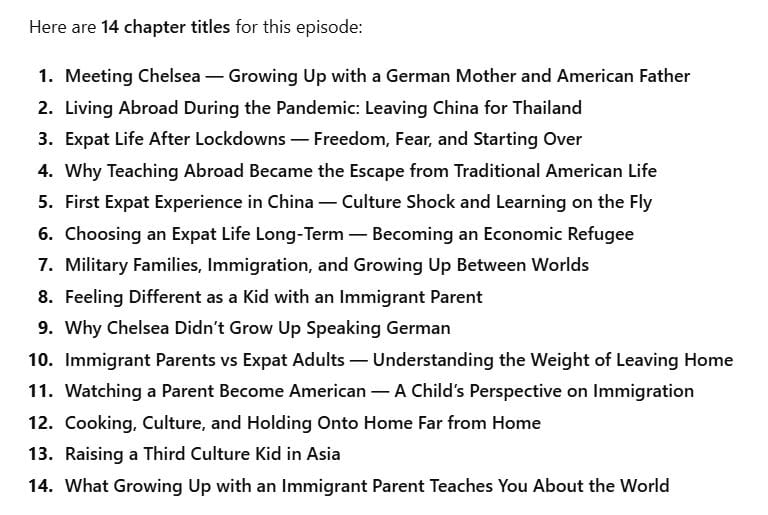
The goal here isn’t to cram keywords into every title. It’s also to make sure each chapter title:
- clearly explains what’s happening in that section
- still sounds like something a human would say
- makes sense out of context
A simple gut check helps:
If someone only saw that chapter title in a list, would they have a decent idea of what they’re about to hear?
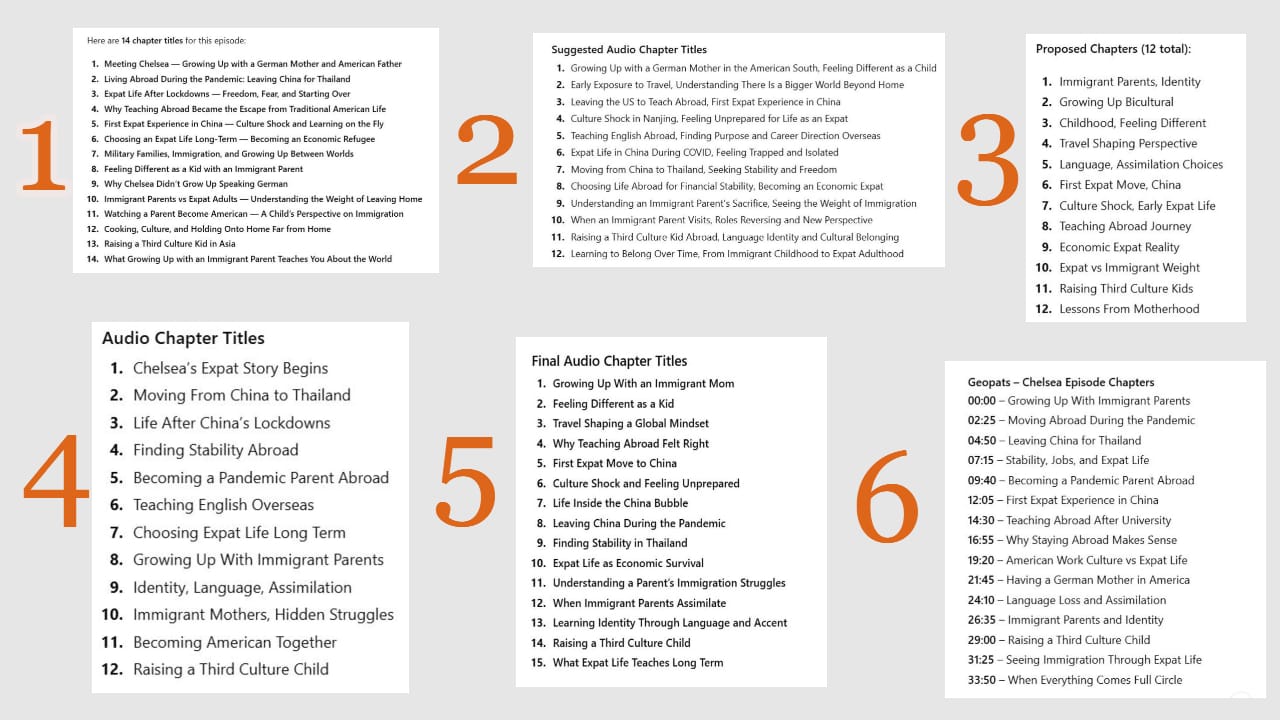
For example, a title like “First expat move to China” works well because it does both jobs. It includes strong SEO search terms, but it also feels specific and story-driven. You can tell something is happening there.
If your chapter titles feel readable, clear, and grounded in the conversation, you’re in a good place. You’re not aiming for perfection here, just clarity and discoverability.
Step 3: Do the Human Timestamp Check
Once the chapter titles feel right, the last step is checking the timestamps.
ChatGPT can suggest timestamps based on pacing, but these are only estimates.

Ideally, you’d listen through the entire episode and confirm that each chapter starts where it should. If you’re short on time, a spot-check works too. Jump to each suggested timestamp and listen from about 10 to 15 seconds before that point. Adjust as needed.
This step matters because inaccurate timestamps break trust. If a listener clicks on a chapter and lands in the middle of a thought, the chapters stop being useful.
Once the timestamps are confirmed, you can add them to your podcast host. Each host handles chapters a bit differently, so it’s worth checking their formatting requirements.
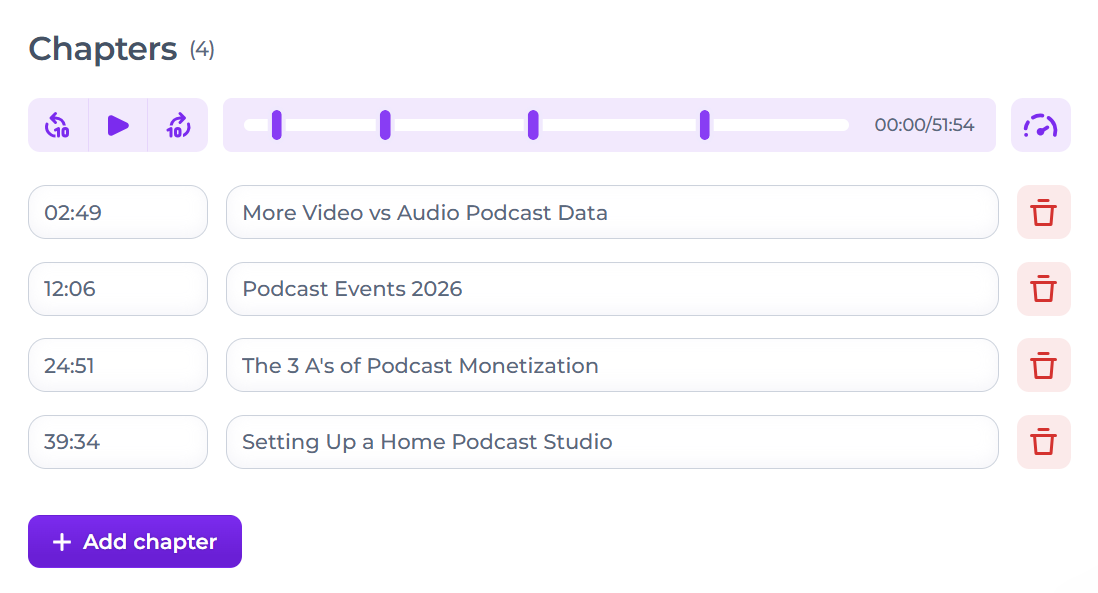
Alitu, for example, automatically generates draft chapters for you, and you can easily listen to each one, adjust the timestamps, and reword the chapter titles.
This final pass is what turns pretty good chapters into something you can feel confident publishing.
Final Thoughts
Audio chapters add clarity to your podcast metadata. They help platforms understand what’s happening inside each episode, and they make it easier for listeners to navigate your content.
If you’ve already optimized your episode titles and show notes, chapters build on that same work at a more detailed level.
ChatGPT can help you move faster by identifying structure and language, but the final decisions still need a human touch. When your content is easier for listeners to understand, it usually becomes easier for platforms to understand as well.
The same goes for Alitu's automatically generated chapters. They're a great first draft, but they often need a little thinning out and rewording. The big benefit here, though, is that it's all easily done in one single place, and you can hit publish on your episode the minute you're happy with it.
With audio chapters sorted, the next question is how this translates to video on YouTube. Timestamps work in a similar way, but there are some important differences worth understanding. That’s what we’ll cover next!
