How to Create YouTube Timestamps for Podcast Videos Using ChatGPT
YouTube timestamps make it easier for viewers to scan your video and jump to what matters to them. When people can quickly find a relevant moment, they’re more likely to keep watching.


As an indy podcaster, you want to save time wherever you can. Copying and pasting your audio chapters (also known as chapter markers) into the episode's YouTube video is a first step in optimizing your YouTube videos. In this post, we’ll take that optimization to the next level using episode transcripts and ChatGPT to create YouTube-friendly timestamps. Timestamps that will make YouTube purr.
As with the rest of this Podcast SEO with ChatGPT series, ChatGPT is an assistant here, not the decision-maker. In today's example, I’m using the premium version of ChatGPT. You can follow the same process with the free version, but you may need to work in multiple sessions if you hit usage limits.
Why are audio chapters and YouTube timestamps different?
At first glance, audio chapters and YouTube timestamps look interchangeable. They both break an episode into sections and label what’s coming next. That’s why it’s tempting to copy one straight into the other.
The problem is that they’re built for very different behavior.
Audio chapters are designed for listeners who mostly press play and keep listening.
They support a linear experience. In a podcast app, chapters act as signposts, helping listeners stay oriented as the episode unfolds. Broad labels work well here because the listener already has context and momentum.
YouTube timestamps are designed for viewers who are deciding where to jump in.
Most people skim the description, scan the timestamps, and choose a specific moment based on what sounds useful or interesting right now. Each timestamp has to stand on its own and make a case for being clicked.
You can see this difference clearly in this example.
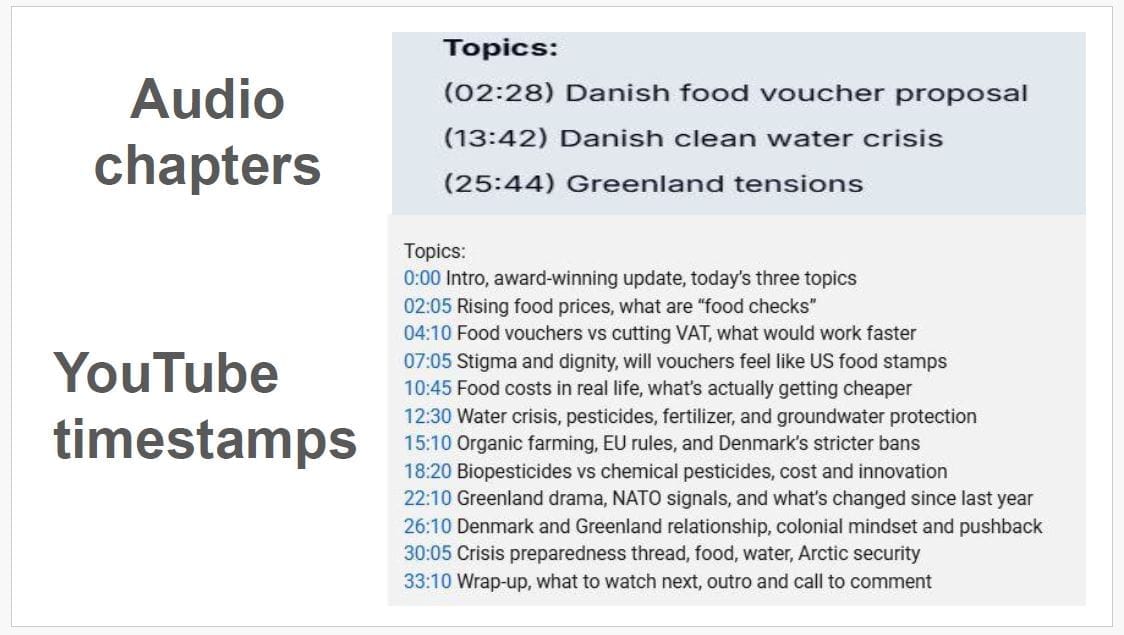
The audio chapters focus on the three main topics to keep things moving forward. The YouTube timestamps, however, break those same themes into more specific entry points, highlighting individual moments, debates, or angles someone might want to jump straight into.
That’s why copying audio chapters directly into YouTube usually falls flat. They’re not wrong, they’re just doing a different job.
On YouTube, the framing shifts from “what comes next?” to “why should I click this?”
Once you approach timestamps with that question in mind, it becomes much easier to rework your chapters into something that actually fits how people use the platform.
Step 1: Draft YouTube timestamps using the transcript
Every podcast episode has natural breaks, even if you’ve never labeled them. At this stage, I use ChatGPT to scan the transcript and draft a first pass at timestamp sections. Its job is not to get everything perfect. It’s to identify clear, distinct segments that could stand on their own inside a YouTube description.
I use a single mega prompt that gives ChatGPT the context it needs to behave. It tells ChatGPT that this is a podcast video, that the format may be mostly static, and that the goal is YouTube timestamps, not audio chapters.
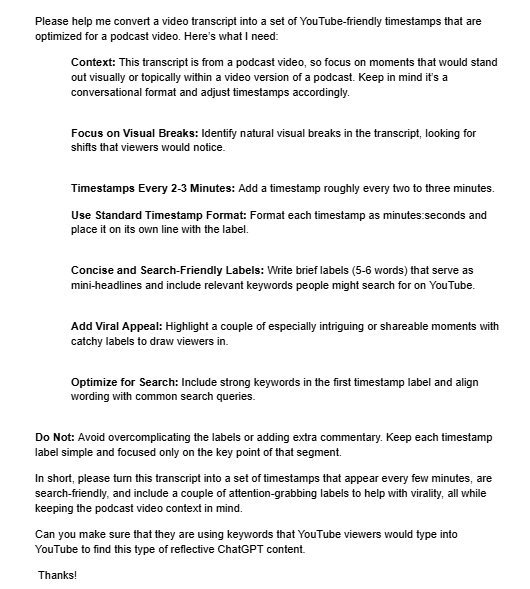
Once you paste the prompt and transcript into ChatGPT, you’re looking for a strong first draft, not a finished result. From there, you can review what it suggested, see what feels useful, and decide what needs adjusting.
That review step is where your judgement comes in, and it’s what we’ll tackle next.
Step 2: Review and Adjust the Sections ChatGPT Identifies
Once ChatGPT gives you a draft, the next step is reviewing the sections it suggested.
Start by scanning the list as a whole and ask a simple question:
If someone skimmed these timestamps without watching the video yet, would the sections feel useful and distinct?
You’re checking whether each section earns its place.
At this stage, a few common issues tend to show up:
- sections that are too close together and could be combined
- sections that feel repetitive or don’t add much on their own
- moments where a clear shift happened but wasn’t captured
Spacing matters, but not in an exact, minute-by-minute way. As a general guide, timestamps every two to three minutes often work well for shorter podcast videos. What matters more is whether the list feels clear at a glance.
In this example, I was working with an eight-minute video. ChatGPT suggested seven timestamped sections. That’s on the higher side for a video this length, but when I read through them, each one felt distinct enough to keep.
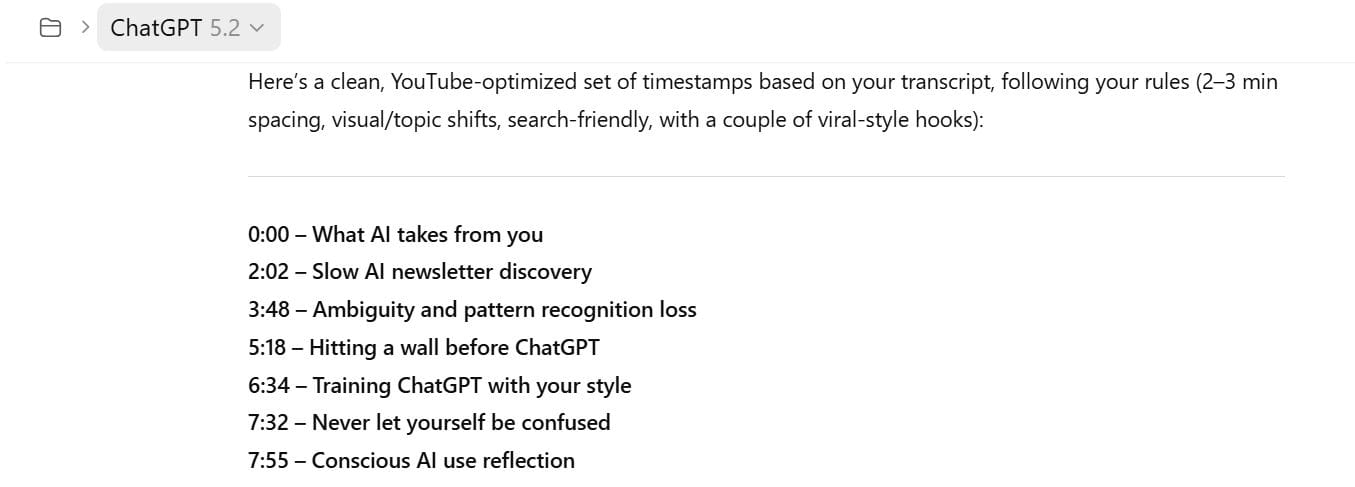
At this point, you’re not polishing language. You’re shaping the outline. Once the sections feel right, you can move on to refining the labels themselves.
Step 3: Refine Timestamp Labels for Clarity and Search Fit
Once the sections feel right, the next step is refining the timestamp labels.
At this stage, I look at each label and ask one simple question:
If I only saw this line in the description, would I know what I’m about to watch?
When the answer is no, the label needs work.
This is where light prompt chaining comes in. Instead of rewriting everything by hand, I give ChatGPT short, specific follow-up instructions to push the labels toward clearer, more search-aware language.
In this example, a label like “never let yourself be confused” was rewritten as “learning without shortcuts or AI.” The second version is clearer, more concrete, and easier to understand at a glance.
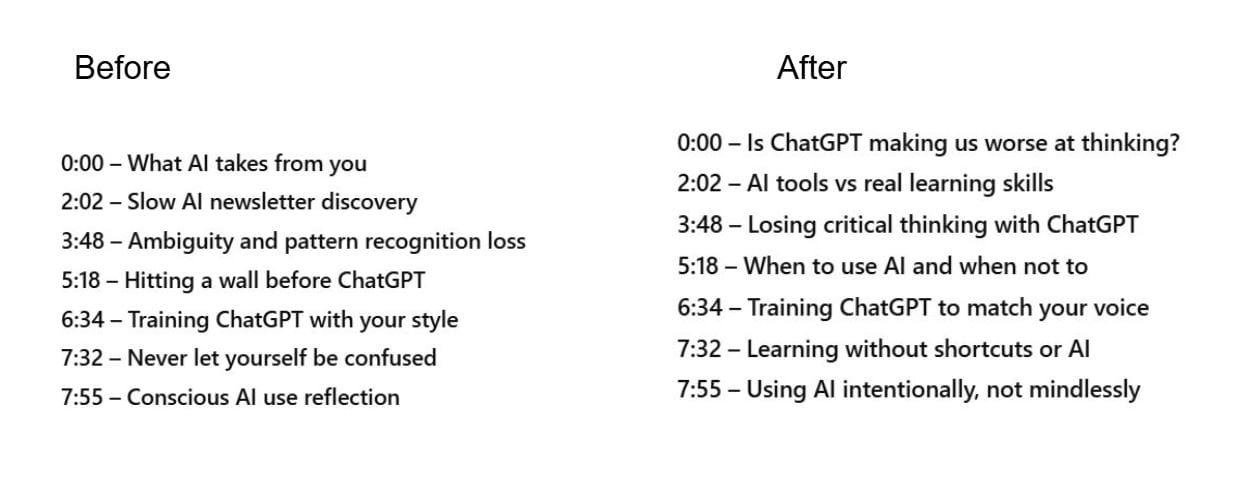
The goal here is not to cram keywords into every label. It’s to make each one clear, specific, and readable without any additional context.
Once the labels make sense on their own, you can stop. From there, you’re ready to add them to YouTube and do a final quality check.
Step 4: Add, Test, and Finalize Timestamps Inside YouTube
ChatGPT can suggest timestamps, but you still need to check them in YouTube. Paste the timestamps into the video description, save, and click through each one to make sure it jumps to the right spot.
You don’t need to rewatch the full video. A quick spot check is enough. If a timestamp lands mid-thought or the label feels awkward in context, adjust it and move on.
Once the timestamps are accurate and easy to scan, save the video. That’s it.
Final Thoughts
YouTube timestamps make it easier for viewers to scan your video and jump to what matters to them. When people can quickly find a relevant moment, they’re more likely to keep watching.
ChatGPT can speed this up by drafting sections and labels, but a quick human review is what makes timestamps actually work on YouTube.
In the final post in this series, we’ll zoom out and pull together the most common pitfalls to watch for when using ChatGPT for podcast SEO.
In the meantime, here are some resources that tie in to what we've talked about today:
